
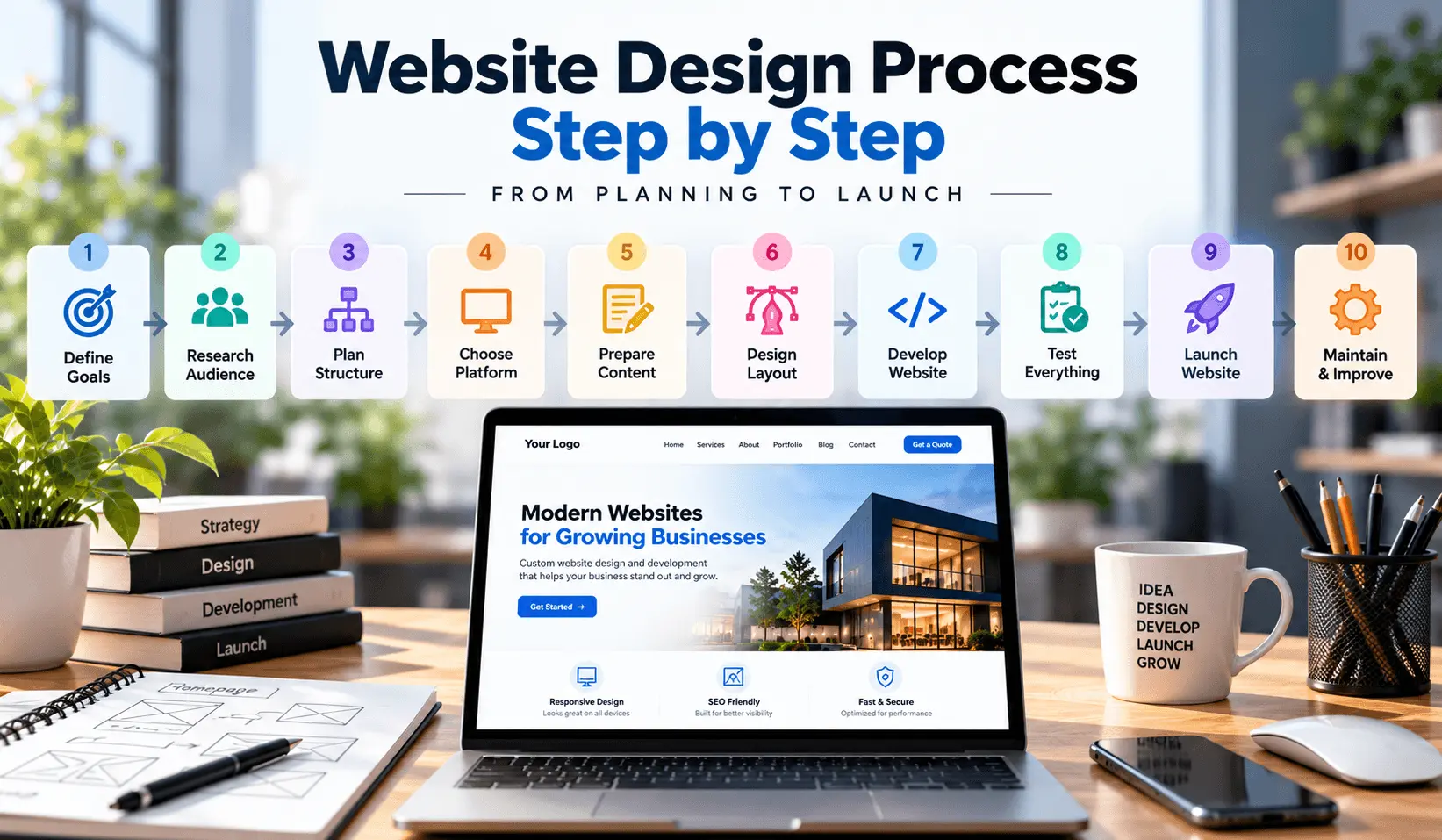
Building a business website involves more than choosing a design and adding a few pages. You need to decide what the site should accomplish, organize the information, prepare the content, build the required features, and test everything before launch.
The website design process step by step typically includes defining goals, researching your audience, planning pages, preparing content, creating the design, developing the site, optimizing for search engines, testing, launching, and maintaining the website.
For a U.S. small business, following these stages helps keep the project organized, reduces avoidable revisions, and makes it easier to understand what needs to happen before the website goes live.
1. Define Your Website Goals
Start by deciding what the website needs to do for your business. The answer will influence its page structure, design, features, and content.
For example, a plumbing company may need visitors to call for emergency service or request an estimate. A consulting firm may want to explain its services and book discovery calls. An online store needs product pages, a checkout process, and payment options.
Write down your main goal and two or three supporting goals before discussing design.
Ask yourself:
- What should visitors do after landing on the website?
- Which products or services need the most attention?
- What questions do potential customers ask before contacting you?
- How will you measure whether the website is working?
Choose a primary action for each important page. A service page might encourage visitors to request a quote, while a portfolio page may help them evaluate previous work before making contact.
What you should have at the end: A clear project brief with business goals, target customers, main services, and desired actions.
2. Research Your Audience and Competitors
The next step is to understand what potential customers need to know before choosing your business.
Review questions you receive by phone, email, or sales calls. Look at customer feedback, common objections, and the information people request before making a purchase. These details can help determine what your website should explain.
You can also review competitor websites to identify useful features, missing information, and common approaches to presenting services.
For example, if you’re a U.S. home improvement contractor, visitors may want to see the types of projects you handle, your service area, project photos, your process, and a straightforward way to request an estimate.
Use competitor research to identify opportunities, not to copy another company’s wording or layout. Your website should reflect your own services, working methods, and business identity.
What you should have at the end: A list of customer questions, competitor observations, and information your website needs to communicate.
3. Plan Your Website Pages and Navigation
Once you understand your audience, decide which pages the website needs and how visitors will move between them.
A small business website might include:
- Home
- About
- Services
- Individual service pages
- Portfolio or case studies
- Blog or resources
- Contact or request a quote
- Privacy policy and other relevant legal pages
You may not need every page on this list. The right structure depends on your business model and the information customers need.
A company offering several distinct services may benefit from separate service pages. An online store will need product categories, product details, cart, checkout, and customer support information.
Create a sitemap before designing the pages. This gives you a clear view of the site’s hierarchy and helps prevent important content from being overlooked.
Navigation should use familiar labels. Visitors shouldn’t have to guess where to find your pricing, service details, or contact information.
What you should have at the end: An approved sitemap, a list of required pages, and a plan for the main navigation.
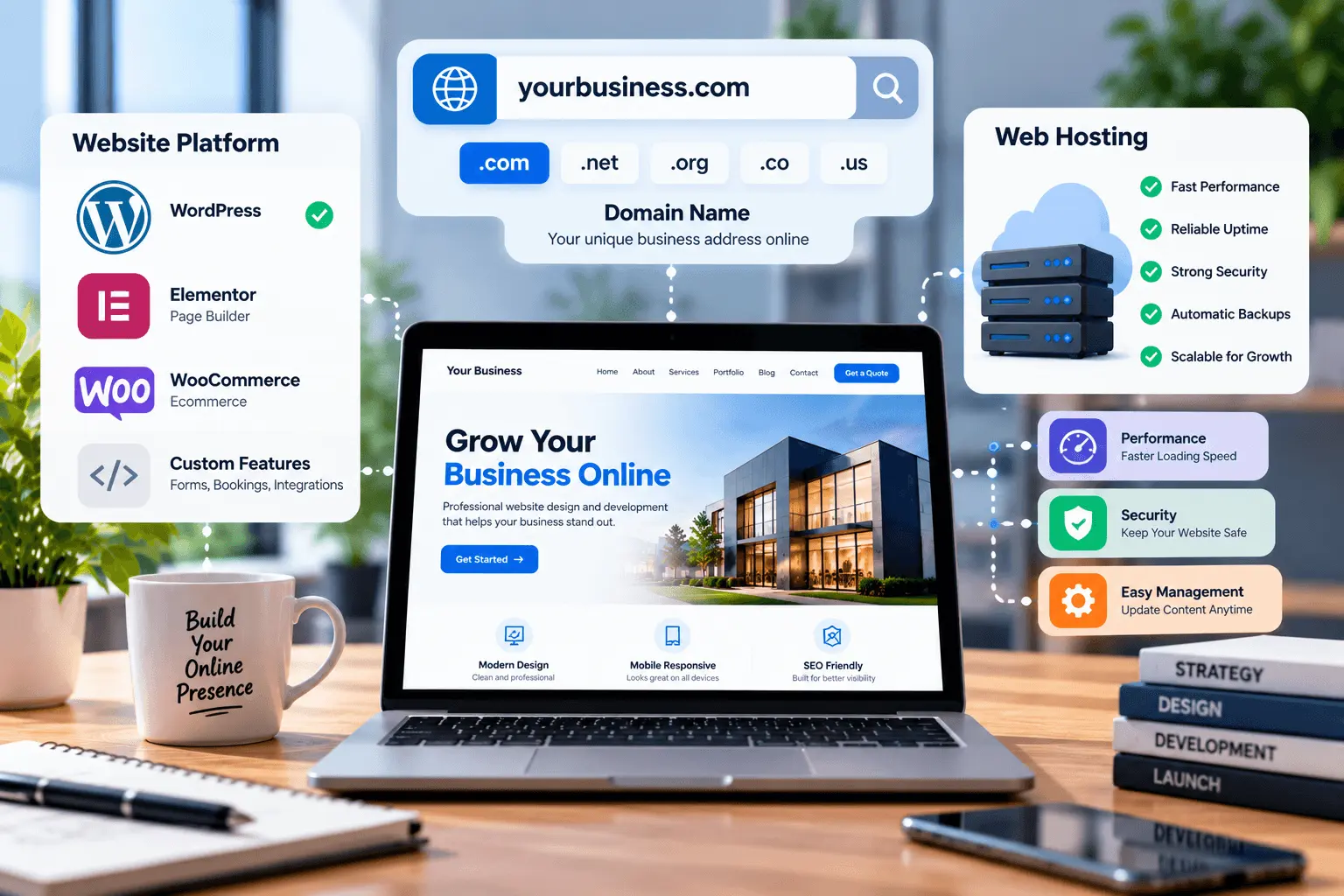
4. Choose Your Platform, Domain, and Hosting
The right website platform depends on what you’re building, who will manage it, and which features you need.
For many small businesses, WordPress is a practical option because it supports a wide range of website types and gives owners control over their content. Elementor can help create and manage page layouts, while WooCommerce adds ecommerce functionality when online selling is required.
Other platforms may be a better fit for some projects. A simple brochure website, a large online store, and a custom web application have different technical requirements.
Before selecting a platform, consider:
- Content management: Can your team update pages without a developer?
- Required functionality: Does the platform support your forms, bookings, payments, or integrations?
- Performance: Can the hosting and implementation support the site’s expected needs?
- Ownership: Who controls the domain, hosting account, and website files?
- Maintenance: Who will handle updates, backups, security, and troubleshooting?
Register the domain in an account your business controls. Choose hosting based on the site’s needs rather than price alone.
What you should have at the end: A platform decision, domain plan, hosting arrangement, and list of required integrations.
5. Prepare Your Website Content
Content should be planned before the final page layouts are approved. Design decisions are easier to make when the actual information is available.
Prepare the copy, photos, logos, service details, product information, testimonials you have permission to use, and other materials the project requires.
For each service page, explain what the service includes, who it is for, what problem it addresses, and what the customer should do next. Avoid broad claims that could apply to any business.
For example, instead of saying that your company offers exceptional service, describe the actual process: how customers request an estimate, what information they need to provide, and what happens after they submit the form.
This is also the time to plan search engine optimization. Research the terms customers use, assign a primary topic to each important page, and organize headings around the questions each page answers.
Google’s SEO Starter Guide explains how clear page organization, useful content, and descriptive links help search engines understand a website.
What you should have at the end: Draft page copy, images, brand assets, calls to action, and an initial SEO content plan.
6. Create the Website Design
With the structure and content planned, the designer can develop the visual direction and page layouts.
This stage usually covers colors, typography, spacing, image selection, navigation, buttons, forms, and the arrangement of content. The design should reflect the business while making important information easy to find.
The homepage often receives particular attention because it introduces the business and guides visitors toward key services. However, service pages, contact forms, and other pages need their own clear layouts.
A useful approach is to review one or two representative page designs before applying the approved direction across the entire website. This can reduce rework if the visual style or layout needs to change.
Review the design on mobile as well as desktop. A layout that looks good on a large screen may have crowded navigation, difficult-to-read text, or poorly positioned buttons on a phone.
What you should have at the end: Approved page layouts, visual styles, and responsive design direction.
7. Develop the Website and Add Functionality
Website development turns the approved designs into a working website.
For a WordPress project, this may involve configuring WordPress, building layouts in Elementor, creating reusable page sections, setting up menus, adding custom fields, and connecting forms or third-party services.
The development work depends on the project scope. A service business may need quote forms and a portfolio. An ecommerce business may require product variations, shipping rules, tax settings, payment processing, and order notifications.
At this stage, the developer should also address technical foundations such as:
- Logical heading structure and page URLs
- Image sizing and optimization
- Mobile-responsive layouts
- Page titles and meta descriptions
- Form validation and error messages
- Appropriate security settings and backups
- Analytics and other agreed-upon integrations
Not every feature should be added simply because a plugin makes it possible. Extra plugins and integrations can increase costs and maintenance requirements. Each one should serve a defined business need.
You can learn more about the options available through MosCreators’ website design and development services.
What you should have at the end: A working website with the agreed-upon pages, features, and integrations ready for review.
8. Test the Website Before Launch
A website that looks finished can still contain problems. Testing gives you an opportunity to find them before customers encounter them.
Review the site on common desktop and mobile screen sizes. Check the main browsers your audience uses, navigate through important pages, and complete the actions visitors are expected to take.
Use this pre-launch checklist:
-
Navigation menus and internal links work correctly.
-
Contact and quote forms submit successfully.
-
Confirmation messages and email notifications work.
-
Phone numbers, email addresses, and business details are correct.
-
Images display at appropriate sizes and quality.
-
Page layouts work on mobile, tablet, and desktop.
-
Page titles, meta descriptions, and headings are in place.
-
Important pages can be crawled and indexed as intended.
-
Analytics and other required integrations are configured.
-
HTTPS, backups, and appropriate security measures are in place.
-
The site’s accessibility and keyboard navigation have been reviewed.
For accessibility, consult the W3C Web Content Accessibility Guidelines (WCAG). For performance, use tools such as PageSpeed Insights to identify issues worth investigating.
Automated tools can help identify problems, but they don’t replace manual testing. Submit forms yourself, inspect the results, and check important tasks from a visitor’s perspective.
What you should have at the end: A tested website, a list of resolved issues, and approval to launch.
9. Launch the Website
Launching means making the approved website available to the public. The exact steps depend on whether you’re publishing a new site or replacing an existing one.
Before launch, confirm that the domain points to the correct hosting environment, HTTPS works, and the final website has the approved content.
If you’re replacing an existing website, review its current URLs before changing anything. Pages that have moved may need appropriate 301 redirects so visitors and search engines can reach the correct destinations. Avoid deleting useful pages without checking their purpose and traffic.
After launch, check the live site again. Test forms, menus, important links, and key pages in the production environment. Confirm that search engines aren’t blocked by an unintended setting and that analytics are recording activity as expected.
A successful launch isn’t the same as an immediate ranking improvement. Google needs to discover and process pages, and search performance can change over time.
What you should have at the end: A live website, verified core functionality, and working tracking and indexing settings.
10. Maintain and Improve the Website
The website design process doesn’t end when the site goes live. Software needs updates, business information changes, and visitors may reveal problems that weren’t obvious during development.
For a WordPress website, ongoing maintenance may include updating WordPress, themes, and plugins; keeping backups; reviewing security; monitoring performance; and fixing technical issues.
You should also review how the website supports your business goals. Look at relevant measures such as quote requests, contact form submissions, product sales, and the pages visitors use before taking action.
Use the findings to decide what to improve. If visitors reach a service page but rarely submit a form, review the page’s information, form usability, and call to action before assuming you need a full redesign.
For ongoing technical support, see MosCreators’ website maintenance service.
What you should have at the end: A maintenance plan, a way to monitor key outcomes, and a prioritized list of future improvements.
How Long Does the Website Design Process Take?
The timeline depends on the number of pages, the amount of custom functionality, content readiness, feedback cycles, and the complexity of the project.
A small business website with a defined scope and prepared content generally requires less work than an ecommerce store with product variations, payment integrations, shipping rules, and custom features.
The client’s part of the process matters, too. Late content, delayed approvals, and repeated changes to the agreed scope can extend the schedule.
Ask your designer for a project timeline that identifies milestones, dependencies, review periods, and launch requirements. A single estimated completion date is less useful if nobody knows when content is due or who needs to approve the design.
What Affects Website Design and Development Cost?
Website pricing is shaped by the work required, not just the number of pages.
Common cost factors include:
- Page count and layout complexity: A group of similar service pages usually requires less work than many individually designed pages.
- Content creation: Writing, editing, photography, and product data preparation may add to the scope.
- Custom functionality: Booking systems, customer portals, advanced forms, and specialized integrations require additional planning and development.
- Ecommerce requirements: Product setup, variations, payment processing, shipping, and tax configuration can increase complexity.
- SEO and performance work: Technical audits, content optimization, migration planning, and performance improvements may require additional effort.
- Ongoing support: Maintenance, content changes, and future development may be separate from the initial build.
Before accepting a quote, ask what is included, what costs extra, who supplies the content, how revisions work, and who is responsible for hosting and maintenance.
You can review MosCreators’ website design pricing to see the published package options. Confirm the current package details and exclusions before making a decision.
Common Website Design Mistakes to Avoid
Several avoidable decisions can make a website project more expensive or less useful.
Starting the design before agreeing on the scope. If the page list and functionality are unclear, the project can accumulate extra work. Approve the scope before development begins.
Waiting until the end to prepare content. Placeholder text and missing images make it harder to evaluate the real design. Prepare important content early.
Treating mobile design as an afterthought. Review responsive layouts during design and development, not just before launch.
Installing too many plugins. Each additional tool can introduce configuration, compatibility, or maintenance requirements. Choose plugins based on actual needs.
Ignoring redirects during a redesign. Replacing URLs without a migration plan can create broken links and disrupt access to existing pages.
Assuming launch means the work is finished. Set aside time and budget for updates, monitoring, and improvements after the site becomes public.
Frequently Asked Questions
What are the main steps in the website design process?
The main steps are defining goals, researching your audience, planning the site structure, choosing the platform, preparing content, designing page layouts, developing the website, testing, launching, and maintaining it.
Some stages overlap. For example, content and SEO planning often begin before visual design is finalized.
Should website content be written before or after the design?
Prepare the main content before finalizing the design. The actual copy, headings, images, and calls to action help the designer create layouts that fit the information visitors need.
You can refine the content during development, but leaving most of it until the end can cause unnecessary revisions.
Is WordPress a good choice for a small business website?
WordPress can be a good choice for businesses that need editable pages, service sections, a blog, forms, or ecommerce functionality. Elementor can make visual page editing more accessible.
The best platform depends on the required features, budget, editing needs, and maintenance plan. WordPress isn’t the right solution for every project.
How can I prepare for a website design project?
Prepare a clear description of your business, your primary website goal, your services or products, existing brand assets, page content, reference websites, and required features. Also identify who will review the work and approve decisions.
The more clearly you define the scope and provide the necessary materials, the easier it is to plan the work.
What happens after a website launches?
After launch, verify the live site, test key functions, monitor analytics, review search indexing, and address any issues that appear. WordPress sites also need appropriate software updates, backups, and security checks.
Use actual visitor behavior and business goals to guide future changes rather than redesigning pages without a clear reason.
Planning a Website for Your Business?
A clear process makes it easier to understand what you’re paying for, what you need to provide, and how each stage contributes to the finished website.
If you’re planning a new business website or replacing an existing one, explore MosCreators’ website design and development services. You can discuss your goals, required pages, functionality, and budget before deciding on the project scope.